Kinship, continued: The Waters Upton ‘Big Tree’

Back in 2020, in Kinship in the parish of Waters Upton in 1841, I wrote about the ‘family tree’ of my Waters Upton one-place study at Ancestry. “‘Forest’ might actually be a better word than ‘tree’,” I said, “given that what I have established is in fact a collection of numerous separate trees growing in one place.” Even then I recognised that, as more connections by blood and/or marriage became apparent, “[quite] a few of those trees were not ‘separate’ after all.” Following some recent work on the ‘forest’ I think it’s time for me to update you on the subject of kinship in the parish of Waters Upton – and introduce you to the ‘Big Tree.’

Normally when a family tree is constructed, its starting point is the person who is building it (or the person for whom the tree is being built by someone else). From that person a branching network of ancestors and relatives grows. If you build your tree on the Ancestry platform, and set yourself as the ‘home person’ of that tree, the profile page for every person in it will tell you how they are related to you. What I am creating for my Waters Upton one-place study is clearly not a normal family tree! I have however set a home person for the ‘forest.’ Let me explain why.

A well-connected couple

As I have described on this site’s home page, the woman who drew me to Waters Upton back in 2011, and sparked the interest that became my one-place study (or OPS), was my 3x great grandmother Mary Titley, née Atcherley. Mary, who died in 1832 and is buried in the churchyard of Waters Upton St Michael, was part of a farming family based at Moortown, not far from Waters Upton in the neighbouring parish of Ercall Magna.
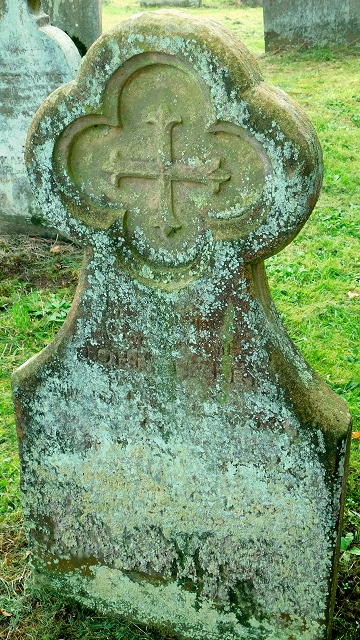
Colour photo of a gravestone in a grassy churchyard. It has a lot of grey-green lichen growth on it, and some green algae, leaving some of the inscription illegible.
The gravestone of John and Mary Titley at Waters Upton.

Mary’s maternal ancestors were the Wase family, established at Waters Upton Hall from the beginning of the 1700s. Amongst her other ancestors in the parish, Mary’s 4x great grandfather Richard Hitchins, baptised on 30 June 1616, was born there.

Mary’s husband John Titley (not my ancestor, but that’s another story) is buried with her at Waters Upton. John was a butcher, but his ancestors were agricultural labourers. His relatives, prior to his marriage to Mary Atcherley, were mostly labourers, or engaged in trades or crafts. The Titleys did not have deep roots in Waters Upton. Nevertheless, John had a 2x great grandmother, Elizabeth Matthews, née Christian, who was a native of the parish and was baptised at St Michael’s on 19 February 1720/21.

Between them, Mary and John had familial connections with a great many people, across the social spectrum, in Waters Upton parish. So I decided a while ago to set Mary as the home person of the growing Waters Upton forest at Ancestry. After that, if anyone in the forest had family ties to Mary, no matter how convoluted or remote, the nature of their relationship was shown on their profile page. This gave me my first feel for the extent of the complex network of connections between the people of the parish. It also made me rethink the ‘rules’ I had set regarding who I should include in the growing forest…

Welcome to the jungle?

I set the rules of admission quite early on, when I was nurturing the saplings. The core people were those who were either born in Waters Upton parish, or came to live in it at some point later in their lives. To explore the stories of those people in more detail, I decided I would also include their spouses, all of their children, plus their children’s spouses, whether or not they were born in or lived in the parish.

Later, to research the extent of kinship in the parish more fully, I adapted my rules and started to add parents, or siblings, sometimes grandparents (even if those relatives weren’t born in, or never lived in, Waters Upton), where this would bring out the relationships between the core people of the OPS forest.

Those connections to my 3x great grandmother, incidentally, could range from a first or second cousin, to something like “1st cousin 1x removed of wife of brother-in-law of 1st cousin 2x removed of husband”! The degree to which an individual is connected to Mary Atcherley Titley isn’t the important thing, it’s the fact they are part of a group of people who are all connected to each other by blood and/or marriage.

A colour photo in which can be seen, above a hedge, the upper parts of a small church with bell turret, and some neighbouring houses. Beyond, the tops of several trees can be seen, including one tree much taller than the others, and considerably taller than the top of the bell turret on the church.
A big tree in Waters Upton. But not the Big Tree.

Gradually, the ‘Big Tree’ within the forest grew ever larger. But how large? Exactly how many – or what percentage – of my forest dwellers were part of this increasingly complicated web of connected people?

The suffix fix

Most family tree programmes will tell you how one person in a tree is related to another. But they aren’t designed to tell you how many people in the tree are related to one particular person. After all, in a typical family tree everyone is related to everybody else, in one way or another. Not so with my atypical tree, the OPS forest! With no quick technological fix available to me, I had to come up with a different solution.

If I had done this after Ancestry introduced MyTreeTags ⇗ I might have created a custom tag called The Big Tree and made a start on adding that tag to everyone I saw who was connected to my 3x great grandmother. Conducting a search for people within the forest, using that tag as the criteria, would then give me the names of all the people so tagged, and display a total. The recent addition by Ancestry of Networks ⇗, part of a suite of Pro Tools ⇗ requiring an additional subscription, provides another possible method.

With neither Tree Tags nor Networks available to me, I came up with something else. I had already started using Ancestry’s name suffix field to identify people who were born in or who lived in Waters Upton, with “[OPS]” as a ‘marker’. So I started adding a new marker for people who were related to Mary Atcherley Titley: [🌳]. As it is a string of three characters (even if one of them is an emoji, and even though this string is in the name suffix field) I can conduct name searches to pick up all the people with the marker.

More recently I started adding a second marker. I wanted to be able to see at a glance whether a given individual without a ‘Big Tree’ marker was not part of the tree, or was someone to whom I had yet to add the marker. For those in the forest who are not (or at least, not yet) in the Big Tree I am adding this marker: [🍃] – a falling leaf, not attached to a tree.

This is a time-consuming solution, and one which is ongoing due to the size of the Waters Upton forest. At the time of writing, there are 7,688 people in that forest, of whom a fraction under 26%, incidentally, have the [OPS] marker.

Treemendous totals
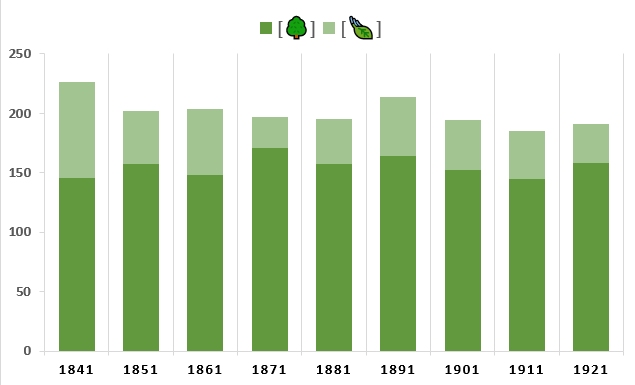
A bar chart showing the total number of people enumerated at Waters Upton in each census from 1841 to 1921 inclusive. The shading of each bar shows the number of people in each year who are, or are not, part of the Waters Upton 'Big Tree'. Further explanation in the article.

The “recent work on the ‘forest’” that I mentioned in my introduction to this article is an attempt to generate some meaningful data from the Big Tree markers. Using census Tree Tags that I had already created, I filtered the list of people in the OPS forest to view those enumerated at Waters Upton in each of the censuses from 1841 to 1921. Then I made sure all of those people had [🌳] or [🍃] markers. This has provided numbers, at fixed points in time over a period of 80 years, for Waters Upton residents who were (or were not) in the Big Tree.

As you can see, in every census year a sizeable majority of Waters Upton’s residents were part of the Big Tree – even in 1841 (64.6%). (See the aforementioned Kinship article for more on the challenges presented by that particular census). The average percentage across the censuses from 1851 to 1921 is just under 80%. Wow. Everyone on the planet is related of course, but I wasn’t expecting the level of provable (if often complex!) connections in my OPS to be quite that high.

I’ll conclude with a few points to be borne in mind (and with a version of the bar chart showing percentages for each census year):

  • The ‘forest’ does not, and never will contain everyone who was ever born in or lived in Waters Upton, nor does it contain all the people who might link a particular ‘forest dweller’ to the Big Tree
  • Further research, examining the ancestry of individuals in the forest more deeply, would (and probably will!) connect more people to the Big Tree
  • Proving connections between people, particularly as we go further back in time, can be difficult, so an unknown number of people in the forest who should be in the Big Tree, are not
  • Depending on the timing of the marriage that (directly or indirectly) connected a previously unrelated forest dweller to the Big Tree, that person might not have been part of the tree when a particular census was taken, or indeed during their lifetime!

(The last of the above points is a cue for more work, perhaps looking at a particular post-1841 census to see the extent of the connections that existed at the time in question. 1871 – with nearly 87% in the Big Tree – looks like it would be a great choice!)
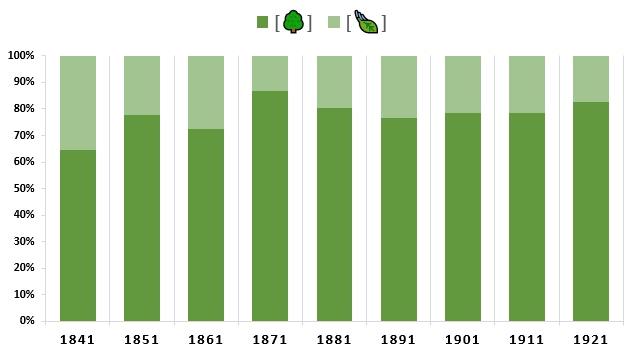
A bar chart showing the percentage of the people enumerated at Waters Upton in each census from 1841 to 1921 inclusive, who are, or are not, part of the Waters Upton 'Big Tree'. Further explanation in the article.

Researching the Waters Upton one-place study on Ancestry

When I started putting this article together it was with the intention of writing about a particular couple who were living in Waters Upton at the beginning of World War 2, and how I found out more about their lives, beginning with the information I had transcribed from the 1939 Register. However it turned into a much more detailed description of how I use of Ancestry for my one-place study research, so I now present a rather different article. It’s not a ‘masterclass’, just an insight (for whatever that’s worth) into my research modus operandi, with some personal opinions along the way. Is there method in my madness, or madness in my method? I’ll let you decide!

The Waters Upton ‘family forest’

My methods, I should make clear, avoid some of the cornerstones of ‘proper’ genealogical research. In particular, when working on the family histories of hundreds of people in a one-place study (as opposed to my own family tree), the purchase of birth, marriage and death certificates in any quantity is an expense which I can’t justify. People and their relatives may grow on (family) trees, but money doesn’t; my heart and soul are committed to the project, my wallet, not so much!

Image containing text: Ancestry, discover your family's history [with the 'story' part of 'history' in bold].

So, my favourite way of researching my own family tree, and the family trees of my Atcherley cousins (in my one-name or surname study) and my DNA matches, is to build their trees at Ancestry, attaching relevant records as I go and adding Tags, notes and details of records not held by Ancestry itself. That’s also what I am doing for my Waters Upton one-place study. The ‘tree’ is not a single family tree but a collection of them, a ‘family forest’ if you like, featuring people who lived in Waters Upton at any point in their lives, plus their families, and some of their ancestors and descendants.

If you have an Ancestry subscription you can visit A One-Place Study – Waters Upton ⇗ at Ancestry.co.uk (or use these links for the .ca ⇗, .com ⇗, and .com.au ⇗ iterations). If you don’t have an Ancestry subscription but have an interest in Waters Upton and its people, and would like to view the ever-growing ‘forest’, let me know and I can send you a link giving you access through Ancestry, by email.

Working with multiple trees in a single Ancestry ‘tree’ is an interesting experience. For example, Ancestry trees aren’t really geared up for the addition in a straightforward way of people who aren’t a parent, spouse or child of a person already in a tree – and to be fair, why would they be? You can find a record for the person you want to add, and from there you can add them to the tree as a new person, but that method doesn’t create an event based on the record. So I usually add my new person as a parent or child of an existing person, then quickly edit their relationship to leave them as an isolated leaf cut off from the rest of the forest.

Take a Hint – or maybe not

Once I’ve added a new person to the tree, perhaps with other family members, I check out any ‘Hints’ that Ancestry might suggest. These Hints – records selected by Ancestry’s algorithms as possibly relating to the person concerned – are very much a double-edged sword. They seem to be based partly on the information you have entered for the person, name first and foremost, and partly on the records which have been attached to people in other Ancestry trees who might be the same as the person you are working on; both of these have the capacity generate some spectacularly inaccurate hints. The results, at their best, have the potential to help you. At their worst, they can completely mislead you.

Ancestry Hints are an anathema to many experienced (and especially professional) genealogists, primarily because they are often inaccurate, and maybe also because using them is seen as laziness. To me, Hints are another search tool to be used, the results of which are to be evaluated carefully and either:

  • discarded if they clearly don’t relate to the person being researched or would disrupt the space-time continuum (sorry about the Trek-speak, I will explain later, honest!),
  • accepted (sometimes provisionally) if they look like a good fit with what I already know about the person, or
  • neither discarded nor accepted initially, but left where they are until I can build up a more complete picture of the person (with other records) and make a better judgement as to whether or not they are relevant.

Over the years that I have been working with Ancestry trees, I have dismissed a huge number of Hints (often with an audible groan or even a curse), but I have also been pleasantly surprised on many occasions by the records they have accurately flagged up in collections or record sets which I would not have thought about looking in.

Image containing text: All Hints.

Other people’s trees

Among the Hints provided by Ancestry – at the top of the list in fact, if they exist – are other Ancestry members’ public family trees featuring the person you are working on (or people with similar names born around the same time). They vary hugely in quality, but because of the number of them built on the back of poor research and lack of critical thinking, Ancestry member trees are the subject of much wailing and gnashing of teeth within the wider genealogical community.

And I am there wailing and gnashing with the best of them when I see trees featuring people with records attached for events which happened after the person allegedly died, or before they were born, or in two widely separated places at the same time. Children born to ‘parents’ who were under 10 or not even alive at the time can be found (one tree I’ve seen, containing over 48,000 people, has a mother and child of the same age), along with mothers giving birth to two children well within 9 months of each other, sometimes on different continents. In one Ancestry tree I have seen a man who was his own father (or his own son, depending on which way you look at it).

Wail. Gnash. See what I mean about disrupting the space-time continuum? Some people’s enthusiasm runs far ahead of their logic, and in my head right now I can see Spock raising a Vulcan eyebrow at the very thought of it.

Part of the problem is that many people accept the aforementioned Hints without evaluating them. Many also copy the contents of other trees (either directly, or through accepting Hints based on those trees) without questioning their accuracy. At the end of the day though, while these practices are frustrating to people who undertake more meticulous genealogical research, in the grand scheme of things what actual harm is being done? There are after all far worse things that people could be up to instead, like axe-murdering or drug dealing, although having said that, when I look at some of the dodgier Ancestry trees I do sometimes wonder whether mind-altering drugs might have been involved.

Dragging myself back to the subject and looking at the positives, there are some well-researched trees on Ancestry. Even the trees which become increasingly questionable as they go further back in time, as people make best guesses based on incomplete evidence (see Beyond Ancestry below), can contain useful and accurate information on the generations closest to the tree builder (typically because they knew them, or have family members who did).

So yes, I look at the trees of others to see what records and family members they have attached to the people I’m researching. And I look at their conclusions to see whether they stand up to scrutiny, often carrying out my own research to see if the evidence I can find supports or contradicts those conclusions. I do the same with the pedigrees compiled and published by people like the Burkes in the 1800s, because they too got things wrong sometimes.

One more thing about Ancestry trees, and it’s another positive. Many people attach photos of their ancestors to their Ancestry tree profiles – and those ancestors can include people you too are descended from, or people in your one-place study. Yes, people also upload images of flags, buildings and other things which can clutter up Hints and search results but hey, Ancestry subscribers have paid good money and can put what they like in their own trees!

For the record, I don’t claim that any of my family trees (on Ancestry or elsewhere) are perfect. My advice is you should always treat with caution, and double check with your own research, other people’s trees – including mine.

Just click Search

There’s another way to get Ancestry to do some of the heavy lifting, and that’s by clicking on the Search button near the top right corner of the profile page of any person in an Ancestry tree. It’s not laziness I tell you, it’s a tool, one that I’m paying for and which you can be sure I make full use of!

Screen grab of part of an Ancestry family tree profile page, showing three buttons labelled Search, Tools, and Edit.

The long and complicated URL in the web address bar of the search results page this generates shows that this search is based on pretty much all of the information held on that person and their immediate family in their profile (whether input directly or pulled in with attached records). That info includes their forename(s), their surname (or surnames if they had more than one, e.g. women who married), their parents’ names, their spouse’s name, their children’s names, their sex, their birth and death dates and places, the places of other events attached to them (censuses), and the default ‘collection focus’ (e.g. All Collections, or UK and Ireland, etc).

This search usually generates a much longer list of results than is seen in Hints (the latter only return results from a limited proportion of Ancestry’s record sets), with the most relevant tending to be at or near the top of the list. But those results depend on the data (including the spellings) submitted, and the data (again including the spellings) in the records indexed by Ancestry. Badly mistranscribed records will usually be missed, unless another Ancestry user has managed to find them and has kindly submitted corrections.

Once I have that results page I examine it for records which look relevant, often looking at associated record images (where they exist) to check that the names (of people and places) match what’s been indexed, and to see what other information is there. If the record looks like it relates to my person, I attach it, and usually I then run the search again to see how the new information affects the results.

If the results don’t at first contain records which appear to relate to my person, I will most likely change the parameters and have another go. I tend not to modify the Search Filters (the Broad to Exact sliders), but I do click on Edit Search and add, remove or modify things in an attempt to improve the accuracy of the search. Sometimes I bypass the Edit Search feature and monkey around with the URL, modifying or deleting parts of it to suit before hitting Enter to rerun the search. In the case of women who married, if the search isn’t picking up records from the years before their marriage removing their husband’s (and children’s) details can help. In the case of a woman who ‘disappears’ after a certain point in time, where I haven’t identified a potential marriage (or have identified several!), deleting her surname altogether and running the search might bring up records showing her under her married name.

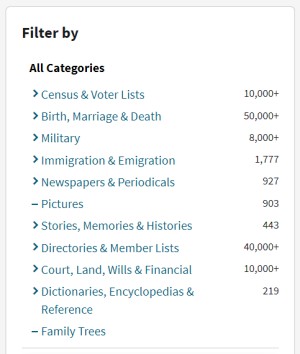
Screen grab of part of an Ancestry search page, showing categories of filters available. These include Census and Voter Lists; Birth, Marriage and Death; Military; and so on.

Search results can also be narrowed down by Category, which can bring to the fore records which otherwise don’t show up on the first page or two of results. If I’m thinking a man might have served in WW1 for example, I click on Military in the list of Category filters and see what comes up. Might they have left a will? Click on Court, Land, Wills & Financial. Did they maybe emigrate, or take trips overseas for business or pleasure? Click on Immigration & Emigration. Birth, marriage or death records not looking they relate? Click on Birth, Marriage & Death (and then filter further, down to an individual record set if need be) to see if a more focused search yields a more likely set of results.

Beyond Ancestry

A frequent (and accurate) refrain amongst genealogists who know the value of archives is “Not everything is online.” To which I must add, having looked so far entirely at one provider, “Not everything that is online is on Ancestry.” Even those records which Ancestry does have aren’t always easy to find, typically due to transcription errors. Some of the record sets on Ancestry are on other sites too, with different ways to search them, or more detailed indexing.

Because of this, while I’m working on a tree at Ancestry I usually have numerous other tabs open so that I can use other sites in parallel. FreeBMD ⇗ continues to stand the test of time when it comes to searching English and Welsh BMD records up to 1984. Because of its inclusion of mother’s maiden names in birth records and reported ages at death on death records right the way back to 1837, the GRO birth and death register indexes ⇗ are also indispensable. Shropshire BMD ⇗ is growing all the time and can help with finding the exact location of a marriage for which the two previous sites only give a registration district (and the same goes for the Staffordshire ⇗ and Cheshire ⇗ BMD websites).

Parish registers for Shropshire, Staffordshire, Cheshire and Wales – all of which are vital when researching the people who made their way to and from a north Shropshire parish – are online at Findmypast, a site which often enables me to find people on the census in a year in which I can’t locate them at Ancestry. (Once I’ve done that, I use the Piece, Folio and Page numbers to search the relevant census collection at Ancestry, and look for the mistranscribed name in the results – then I can at last attach the record to the relevant person’s profile.) FamilySearch ⇗, the Shropshire Archives collections catalogue ⇗, the British Newspaper Archive ⇗, Streetmap.co.uk ⇗, National Library of Scotland maps ⇗, Google and Google Books ⇗, the list goes on, and on (and it includes pages from this website!).

A montage of logos / brand names of some genealogy website: Free BMD, Find my Past, National Library of Scotland, FamilySearch, and The British Newspaper Archive.
Other websites are available!

Building families

As I follow the above processes I’m usually working not just on one person but the rest of their family too, adding them to the tree as I go. Some family members I add manually (perhaps after searching for relevant birth or baptism records), others are added automatically when census records (for example) are attached to an individual. Caution is needed with the latter approach. Post-1841 censuses recorded how people in a household were related to its Head – those described as sons and daughters of a male Head of a household were not necessarily all children of his then wife. Former wives (and their role as mothers) can all too easily be missed. There are many other pitfalls which can beset attempts to accurately reconstruct of families, but they are beyond the scope of this article. I hope to illustrate some of them with examples in later stories.

A line has to be drawn somewhere in adding people to a tree within the one-place forest, but I have no hard and fast rules about where I draw it. Ultimately I want to know about the connections within and between the families of those who were born in the parish or came to live there at some point, and what happened to those who left (as so many did), in order to better understand the influence of the family on these movements. I also want to pursue interesting stories when I see them. So for example when I found a Waters Upton family which had twins in two successive generations, I followed them a further generation back, before they lived in the parish, and found twins in that generation too (plus a family member who briefly worked as a servant in the village and so appeared there on a census!).

To conclude, although Ancestry is much maligned (sometimes by myself, and often with good reason), for working on family trees and finding records which help to map out and understand the lives of the people within them – including those in my Waters Upton one-place study – I wouldn’t be without it.

Note (added Feb 2026): Ancestry is always tinkering and messing about with the appearance and functionality of their family tree offering (sorry, I mean that their family tree offering is always evolving…). As a result, as time goes on, some of the images above, and some of my descriptions of processes used when building the Waters Upton tree/forest at Ancestry, have (and will) inevitably become outdated. I may come back at some point and update this article. In the meantime, you might be interested in Kinship, continued: The Waters Upton ‘Big Tree’.


Picture credits. Screen grabs from Ancestry: Used for illustrative purposes only, all rights remain with Ancestry.com. FreeBMD, Findmypast, National Library of Scotland, FamilySearch and The British Newspaper Archive logos: Composite image made from screen grabs from the respective websites, used for illustrative purposes only, all rights remain with the companies and organisations which own the logos.